Cash Register & Connectivity
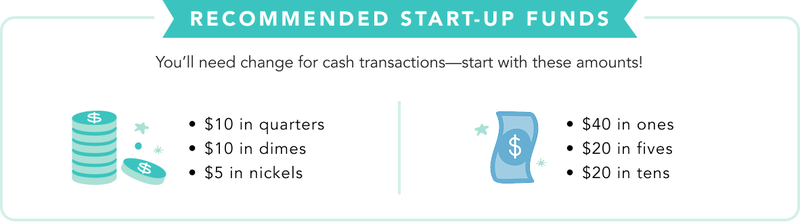
We recommend setting up your cash register on your fair delivery day to allow for Square register updates to troubleshoot any potential issues and ensure it’s working properly. Please be sure to only use the equipment that’s packaged with each register—they don’t mix and match!
Find more information in your Cash Register Guide, or watch the step-by-step cash register videos found at the end of this article.
Preparing an Internet Connection
Your cash register needs a strong internet connection. You can connect via Ethernet to a data port or wirelessly through a secure, password-protected network. Registers will not work on unsecured guest networks.
Your school’s firewall must allow transfer of data so that you can process credit cards, gift cards, and paid orders. Even if you’re successfully connected to the internet, a firewall could still prevent transactions from working properly. Please use our Square Cash Register Connectivity Guide to ensure your device will function without restrictions.

Setting Up Your Register
The cash register will come pre-assembled. Verify you have all the parts listed in the Cash Register Guide. Because there are many cords to these registers, we’ve made sure to plug them into their respective devices before sending them your way. Carefully remove the register from the box, leaving all connections intact. All you have to do is connect them to a power source. Please don’t mix and match, or the equipment will not work. Leave the cash register turned on overnight to allow for any automatic Square updates and avoid delays for early morning shoppers.
Your register has already been configured to your school. To set it up, follow the instructions below:
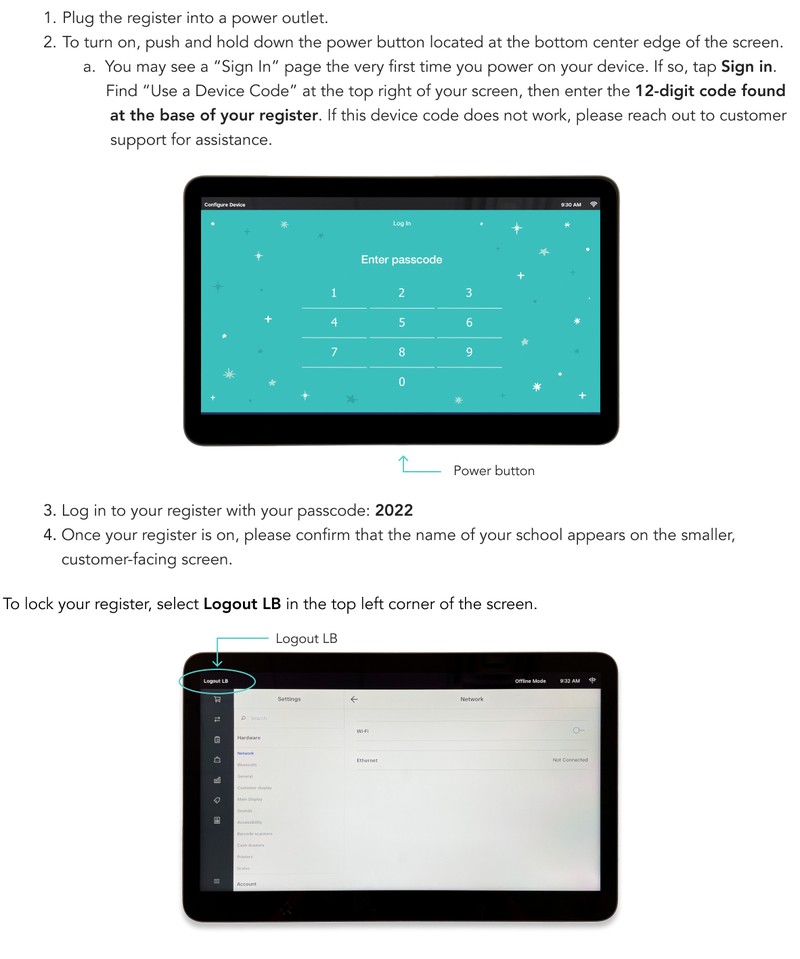

If you have multiple registers, they all must have an active internet connection. If one is not connected, please reach out to your school’s IT team to ensure they have opened up multiple ports for connectivity.
If using a MiFi device, remember that it requires a “clear and constant” connection to the nearest cell tower; you may need to place it by a nearby window to strengthen its connectivity. Please remember to return it in the Register & Equipment box after the fair.
Penny Rounding for Cash Payments
Because pennies are no longer being minted in the U.S. and are becoming less common in circulation, cash payments are rounded to the nearest five cents (nickel) on your cash register.
This only applies to cash payments. Card, tap, and other electronic payments are not rounded.
When a customer pays with cash, the final total is automatically rounded to the nearest $0.05 at the point of sale.
How it works:
- Totals ending in 1¢ or 2¢ round down
- Totals ending in 3¢ or 4¢ round up
- Totals ending in 6¢ or 7¢ round down
- Totals ending in 8¢ or 9¢ round up
- Totals ending in 5¢ stay the same
Example:
If a customer’s total is $7.58 and they pay with cash, the total rounds to $7.60. If they pay with a $10 bill, they would receive $2.40 in change.
The rounding adjustment appears clearly on the receipt.
For more information on pennies in the United States, please visit the U.S. Department of the Treasury article here.
Literati Support is available Monday–Friday, from 7am-9pm Central Time. For fastest response during peak times, please send an email to LBFsupport@literati.com. To contact our Support team via phone, call (833) 699-1890, option 2.
Cash Register Videos