Requesting Replenishment
We know you might need additional books and supplies during your book fair. Replenishing with Smart Picks and Auto-Submit saves time and grows your sales by automatically selecting and sending the items most likely to sell at your fair.
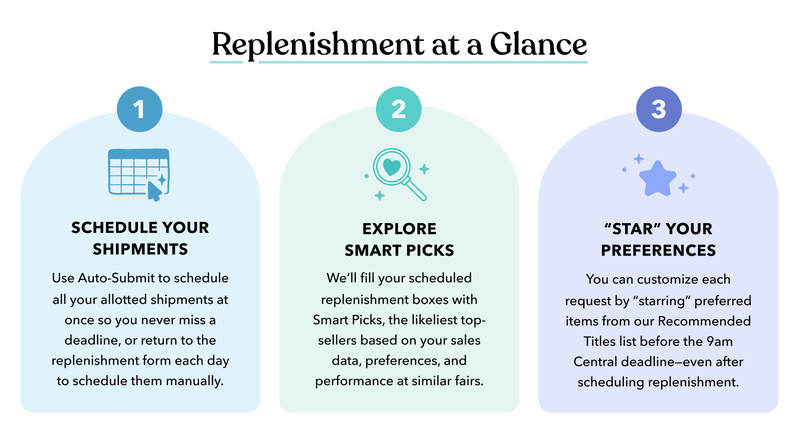
“Set and Forget” with Auto-Submit
Your replenishment form opens one week before your in-person fair begins. Here, you can easily reference your available replenishment dates.
Auto-Submit allows you to “set and forget” all of your allotted replenishment requests at once, so you’ll never miss a submission deadline. You can still customize your replenishment requests by “starring” your preferences each day.
But even if you never return to the form, using Auto-Submit ensures each of your requests will be fulfilled with the best available Smart Picks.
Do-It-Yourself with Manual Scheduling
If you choose not to use Auto-Submit, you’ll have to return to the form and submit each request manually (before the 9am CT deadline). We recommend this option if you expect your school to need only one or two replenishment shipments.
You can schedule one request per day, with each day resetting for new orders at 9:00 am Central Time. Requests can be modified up until the 9am submission deadline. Calling Customer Support to request replenishment will count as one of your allotted requests.
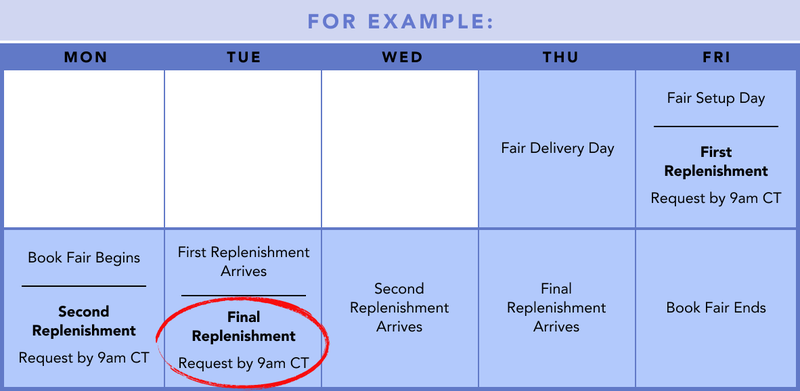
Requests must be scheduled by 9am Central Time for shipping to begin the same day; only then can they be processed before our carrier’s scheduled pick-up time. Those submitted after 9am will be sent out the next day, provided you have three or more selling days remaining.
For example, if your fair ends on a Friday, then your last replenishment order must be placed before 9am CT on Tuesday. Visit the Replenishment Request form on OpenBook to view your school’s exact replenishment window. If you missed the replenishment deadline or no longer have the opportunity to replenish, we recommend taking paid orders to get your readers the books they need.
Smart Picks for Your School
Smart Picks are the likeliest top-sellers at your unique book fair, based on your school’s enrollment and grade levels, past fair sales, real-time sales, and comparable schools’ sales data. Picks are updated every four hours; see the latest anytime you want by checking your replenishment form’s Recommended Titles list.
While it’s easy to interpret empty shelf spaces as unmet demand, our data show that 1-to-1 replacement orders limit your school’s sales potential. Smart Picks offer a more comprehensive projection of which items will sell the best at your particular school, and they introduce students to a wider variety of books!
You can also customize your replenishment requests by “starring” preferred items. In the Recommended Titles list, just click the star icon to the right of any item to mark it as a preference. We can’t guarantee these, but we’ll make every effort to send them!
Please note: Even if you’re using Auto-Submit, you must return to the replenishment form each day to “star” any preferences for each separate order.
Inventory & Delivery
We’ll do our best to fulfill your requests based on our available inventory. Please note that items marked as “Not Available” are not eligible for replenishment, but you can check back the next day to see if we’ve received more in stock.
You can also place paid orders for unavailable items or encourage shoppers to find what they want at your school’s online fair.
If an item you want to replenish doesn’t appear in the full catalog or in your search results, that item isn’t available. Please don’t contact Customer Support to request the item, as they have access to the same inventory.
Depending on your area, orders should arrive within two days—though carrier transit times can vary. Tracking information will be provided via email, along with a copy of your packing list. Notify your front office about any anticipated replenishment boxes to ensure they promptly reach your fair location.